苹果iphone6s plus怎么关闭应用推送消息
时间:2015-12-19 13:40:03 作者:游戏厂商 来源:APP178手游网整理 我要评论
苹果iphone6s plus怎么关闭应用推送消息?手机上的应用推送通知很是烦人,还消耗电量,下面小编介绍iphone6s plus应用推送消息关闭教程,一起来了解下吧!
苹果iphone6s plus怎么关闭应用推送消息?
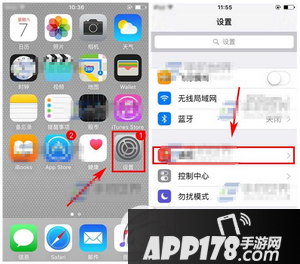
1)点击【设置】进入,然后点击【通知】一栏。(如下图)
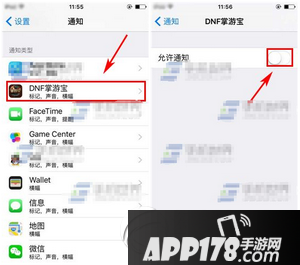
2)接着选择要关闭的【应用】,最后关闭【允许通知】右边滑块即可。(如下图)